
Download Livepolls Mindmaps – AI‑Powered Mind Mapping Tool
Overview
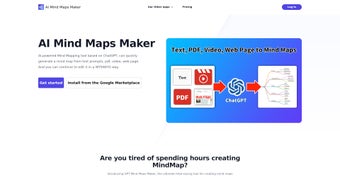
Livepolls Mindmaps is a cloud‑based mind‑mapping solution that combines the creativity of visual brainstorming with the speed of artificial intelligence. Built on top of the latest ChatGPT models, the platform can ingest a wide range of source material—short text prompts, full‑length PDFs, YouTube or Vimeo videos, and even live web pages—and instantly transform that information into a clean, hierarchical mind map. Because the service lives entirely in the browser, there is no need for cumbersome installations or licence keys; users simply log in, upload or paste their content, and watch the AI do the heavy lifting.
The resulting maps are fully editable in a real‑time WYSIWYG canvas, allowing you to tweak node titles, rearrange branches, change colours, and add custom icons without ever leaving the page. Whether you are a university student trying to organise lecture notes, a marketer outlining a campaign funnel, or a product manager visualising a roadmap, Livepolls Mindmaps promises to shave hours off the ideation phase. The tool also integrates with Google Workspace, offering shareable links and collaborative editing that fit naturally into existing team workflows.
Security is baked in: all data travels over HTTPS, is encrypted at rest, and benefits from optional two‑factor authentication. In short, Livepolls Mindmaps delivers a seamless blend of AI convenience, visual clarity, and enterprise‑grade security—all from a single, cross‑platform web app.
Key Features & Benefits
- AI‑Generated Maps: The engine automatically extracts main ideas, sub‑topics, and relationships from any supported source, producing a ready‑to‑edit mind map in seconds.
- Multi‑Source Input: Accepts plain text, PDFs, video URLs, and live web pages, giving users flexibility to work with the content they already have.
- Real‑Time WYSIWYG Editing: After generation, every node can be renamed, recoloured, resized, or repositioned directly on the canvas.
- Collaboration Ready: Shareable links and Google Workspace integration let multiple users co‑author, comment, and view changes instantly.
- Cross‑Platform Access: Runs in any modern browser on Windows, macOS, Linux, Android, or iOS—no separate apps required.
- Secure Cloud Storage: All maps are saved encrypted, with version history, automatic backups, and export options (PNG, SVG, PDF).
- Custom Templates: Pre‑designed layouts for education, business strategy, product development, and creative brainstorming accelerate setup.
- Continuous AI Updates: Subscribers receive automatic upgrades to the underlying language model and new feature rollouts at no extra cost.
- Export & Integration: Maps can be exported as images or PDFs and embedded in tools like Trello, Asana, Slack, or Microsoft Teams.
- Accessibility Features: Keyboard navigation, high‑contrast mode, and screen‑reader friendly labels ensure inclusive use.
Installation, Usage & Compatibility
Because Livepolls Mindmaps is delivered as a SaaS web application, there is no traditional installation process. Getting started involves three straightforward steps that can be completed in under five minutes, even for users with limited technical experience.
Step 1 – Create and Verify Your Account
Navigate to the official Livepolls Mindmaps landing page or launch the app from the Google Workspace Marketplace. Click “Sign Up,” enter a valid email address, and choose a strong password. A verification email will be sent; follow the link to activate your account. New users are automatically granted a 7‑day free trial that includes unlimited map generation and export capabilities.
Step 2 – Choose Your Input Method
Once logged in, the dashboard presents four primary input options: Text Prompt, PDF Upload, Video URL, Web Page Link. Select the appropriate method, provide the content, and press “Generate Map.” The AI processes the data on secure servers and returns a structured mind map typically within 30‑60 seconds for documents under 50 pages. For larger files, progress is displayed, and you can continue working on other tasks while the map is being built.
Step 3 – Edit, Share, and Export
The generated map appears on an interactive canvas. Use the left‑hand toolbar to adjust fonts, colours, line styles, or to insert custom icons. Drag‑and‑drop nodes to rearrange hierarchy, double‑click to rename, and add new branches as needed. When satisfied, click “Export” to download the map as PNG, SVG, or PDF, or copy the shareable link for real‑time collaboration. The “History” tab records every version, allowing you to revert to earlier drafts or compare changes over time.
Compatibility: Livepolls Mindmaps runs flawlessly in Chrome, Firefox, Edge, Safari, and Chromium‑based mobile browsers on Android and iOS. No plugins, extensions, or desktop clients are required, making it ideal for mixed‑device teams and remote workers.
Final Verdict, Pros & Cons, FAQ & Call to Action
Pros
- AI creates detailed mind maps in seconds, dramatically reducing manual effort.
- Supports a wide variety of source formats, eliminating the need for pre‑processing.
- Real‑time collaborative editing integrates smoothly with Google Workspace.
- Secure cloud storage with version control safeguards intellectual property.
- Continuous AI model upgrades keep the tool future‑proof.
Cons
- Requires a stable internet connection; offline work is not possible.
- Subscription pricing may be a hurdle for occasional users.
- AI occasionally misinterprets highly technical jargon, needing manual tweaks.
- Export limited to image and PDF formats; no native .mindmap file.
- New users may need a short learning curve to master AI‑driven workflows.
Frequently Asked Questions
Can I use Livepolls Mindmaps on a mobile device?
Yes. The web app is fully responsive and works in mobile browsers on both Android and iOS, providing the same AI generation, editing, and export features as the desktop version.
Is there a free version or trial available?
Livepolls Mindmaps offers a 7‑day free trial with unlimited map creation and export. After the trial, you must select a monthly or annual subscription to continue using the service.
How does the AI handle copyrighted material?
The AI processes uploaded content on secure servers and does not retain the original files after the map is generated. Users remain responsible for ensuring they have the right to upload any copyrighted material.
Can I integrate the generated maps with other project‑management tools?
Exported PDFs or images can be attached to platforms such as Trello, Asana, Jira, or Notion. The shareable link can also be posted in Slack, Microsoft Teams, or any other communication tool for quick access.
What security measures protect my data?
All data transmission uses HTTPS, storage is encrypted at rest, and two‑factor authentication is optional. The platform complies with GDPR and CCPA standards, ensuring robust privacy protection.
In summary, Livepolls Mindmaps delivers a compelling mix of AI‑driven speed, visual flexibility, and secure cloud collaboration. While the reliance on an internet connection and the subscription cost are considerations, the productivity gains for students, educators, marketers, and product teams are substantial. If you’re ready to modernise your brainstorming process and eliminate the tedium of manual diagramming, give Livepolls Mindmaps a try.
Download Livepolls Mindmaps now and start your free trial to experience AI‑powered mind mapping today.



.png)



